Linux 下 Tensorflow 基础教程

目录

1. Tensorflow GPU 安装

我的机器是 Thinkpad T480, 操作系统是 Ubuntu 18.04 LTS, 显卡 NVIDIA MX150 是支持 CUDA 的。Tensorflow 官方推荐使用 Docker 安装 TensorFlow GPU

TensorFlow GPU support requires an assortment of drivers and libraries. To simplify installation and avoid library conflicts, we recommend using a TensorFlow Docker image with GPU support (Linux only). This setup only requires the NVIDIA® GPU drivers

Docker uses containers to create virtual environments that isolate a TensorFlow installation from the rest of the system. TensorFlow programs are run within this virtual environment that can share resources with its host machine (access directories, use the GPU, connect to the Internet, etc.). The TensorFlow Docker images are tested for each release.

Docker is the easiest way to enable TensorFlow GPU support on Linux since only the NVIDIA® GPU driver is required on the host machine (the NVIDIA® CUDA® Toolkit does not need to be installed).

1.1. 安装 NVIDIA 显卡驱动

我们建议使用官方源自动安装, 其他安装方法可以参考 How to install the NVIDIA drivers on Ubuntu 18.04 Bionic Beaver Linux

1
2
3
4
5
6
7
8
9
10
11
12
13
14
15
16
17
18
19
$ sudo apt-get update
$ sudo apt-get upgrade

$ ubuntu-drivers devices
== /sys/devices/pci0000:00/0000:00:1c.0/0000:01:00.0 ==
modalias : pci:v000010DEd00001D10sv000017AAsd0000225Ebc03sc02i00
vendor : NVIDIA Corporation
model : GP108M [GeForce MX150]
driver : nvidia-driver-390 - distro non-free recommended
driver : xserver-xorg-video-nouveau - distro free builtin

$ sudo apt install nvidia-driver-390

# 重启
$ sudo reboot

# 判断是否安装成功
$ nvidia-smi
$ nvidia-settings

如果 nvidia-smi 报错:

NVIDIA-SMI has failed because it couldn’t communicate with the NVIDIA driver. Make sure that the latest NVIDIA driver is installed and running.

进入 BIOSSecure Boot 改成 Disable。重新登录系统可以看到:

1
2
3
4
5
6
7
8
9
10
11
12
13
14
15
16
17
18
19
$ nvidia-smi            
Wed Dec 5 20:07:40 2018
+-----------------------------------------------------------------------------+
| NVIDIA-SMI 390.77 Driver Version: 390.77 |
|-------------------------------+----------------------+----------------------+
| GPU Name Persistence-M| Bus-Id Disp.A | Volatile Uncorr. ECC |
| Fan Temp Perf Pwr:Usage/Cap| Memory-Usage | GPU-Util Compute M. |
|===============================+======================+======================|
| 0 GeForce MX150 Off | 00000000:01:00.0 Off | N/A |
| N/A 47C P0 N/A / N/A | 170MiB / 2002MiB | 3% Default |
+-------------------------------+----------------------+----------------------+

+-----------------------------------------------------------------------------+
| Processes: GPU Memory |
| GPU PID Type Process name Usage |
|=============================================================================|
| 0 1791 G /usr/lib/xorg/Xorg 131MiB |
| 0 2379 G /usr/bin/compiz 38MiB |
+-----------------------------------------------------------------------------+

1.2. 安装 Docker

参考 Docker 官网教程 Get Docker CE for Ubuntu

1.3. 安装 nvidia-drivers

参考 github.com/NVIDIA/nvidia-docker

1
2
3
4
5
6
7
8
9
10
11
12
13
14
15
16
17
18
19
20
# If you have nvidia-docker 1.0 installed: we need to remove it and all existing GPU containers
$ docker volume ls -q -f driver=nvidia-docker | \
xargs -r -I{} -n1 docker ps -q -a -f volume={} | \
xargs -r docker rm -f
$ sudo apt-get purge -y nvidia-docker

# Add the package repositories
$ curl -s -L https://nvidia.github.io/nvidia-docker/gpgkey | \
sudo apt-key add -
$ distribution=$(. /etc/os-release;echo $ID$VERSION_ID)
$ curl -s -L https://nvidia.github.io/nvidia-docker/$distribution/nvidia-docker.list | \
sudo tee /etc/apt/sources.list.d/nvidia-docker.list
$ sudo apt-get update

# Install nvidia-docker2 and reload the Docker daemon configuration
$ sudo apt-get install -y nvidia-docker2
$ sudo pkill -SIGHUP dockerd

# Test nvidia-smi with the latest official CUDA image
$ docker run --runtime=nvidia --rm nvidia/cuda:9.0-base nvidia-smi

1.4. 启动 Tensorflow GPU Docker 镜像

1
2
3
4
5
# 下载 docker 镜像, 标签 latest-devel-gpu-py3 表示该镜像包含 GPU, Python 3 和源代码。
$ docker pull tensorflow/tensorflow:latest-devel-gpu-py3

# 启动 docker 镜像
$ docker run --runtime=nvidia -it -p 8888:8888 tensorflow/tensorflow:latest-devel-gpu-py3 bash

进入 bash 后, 执行 Python 代码

1
2
3
4
5
$ python
>>> import tensorflow as tf
>>> hello = tf.constant('Hello, TensorFlow!')
>>> sess = tf.Session()
>>> print(sess.run(hello))

Your CPU supports instructions that this TensorFlow binary was not compiled to use: AVX2 FMA

1
2
import os 
os.environ['TF_CPP_MIN_LOG_LEVEL'] = '2'

1.5. 登录 Jupyter Notebook 页面

我运行 latest-devel-gpu-py3 镜像时,登录 http://localhost:8888/ 一直提示 This site can’t be reached。后来下载了默认镜像,结果就能正常登录,不清楚是不是 latest-devel-gpu-py3 这个镜像不支持 Jupyter Notebook

1
2
$ docker pull tensorflow/tensorflow
$ docker run --runtime=nvidia -it -p 8888:8888 tensorflow/tensorflow

现在,打开浏览器输入 http://localhost:8888/ 即可进入 Jupyter Notebook 页面。

2. Tensorflow 入门

2.1. 深度学习入门

2.2. Ten搜人flow 架构
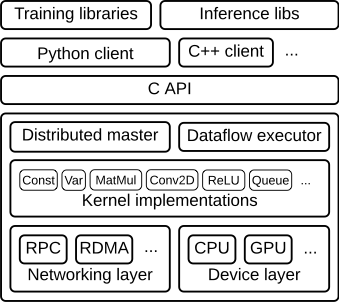
Tensorflow 架构

(未完待续…)

坚持原创技术分享,您的支持将鼓励我继续创作!